
Look Up and Find Errors
Lookup
The Lookup function is for viewing purposes only. It allows you to look up the transactions of a specific Category or Subcategory to get all the details. Use the down arrow on row 5, in column M to select a Category or Subcategory.
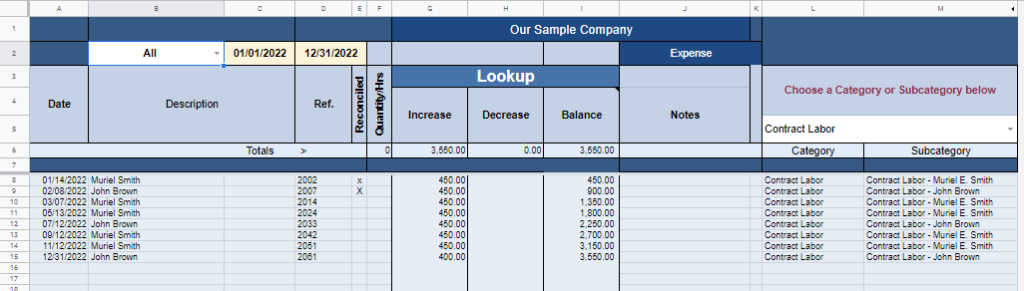
Lookup Expenses Categories
To find where a transaction originated, click anywhere in the row, then click the Find Transaction button on the sidebar menu. Doing this will take you to the ACCOUNT and the specific row where the transaction originated.
Transfer List
View the Notes in column J of the Transfer List to see if there are any transfer pairs with the other half of the transaction missing. This is caused by both importing transactions and manually entering the same transfers. If an ACCOUNT is set up for importing you should NOT also manually enter the transactions as it will cause duplicates in the system.
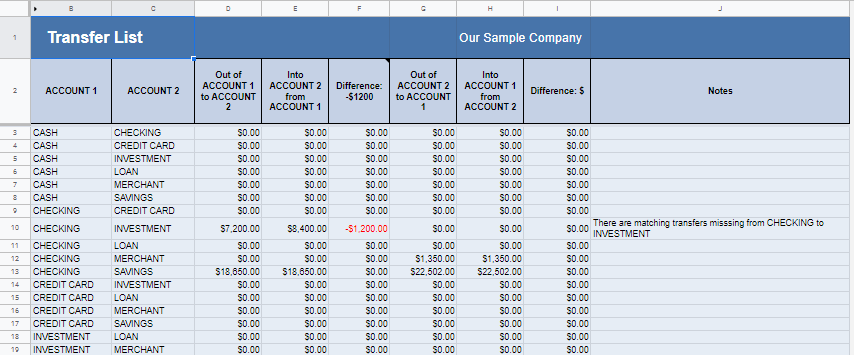
Uncategorized List
View the Uncategorized List to see if some transactions have NOT been categorized or if they have been put to an Invalid Category. You will see a list of transactions with the sheet and row number where you can find the uncategorized entry (indicated by a red flag) and assign a proper Category to correct the reports.
