
Starting a New Year
Start a New Year
Here’s how you can make a copy of your current Big E-Z Accounting template for the new year.
First be sure:
- All of your ACCOUNTS, Categories and Subcategories are named the way you like them
- All of your transactions are entered and your ACCOUNTS are up-to-date and are reconciled through the year-end
- You have verified that the reports on the Control Sheet are in balance and your cash and credit card balances match to the bank statements at year-end
Now, from the top menu bar from within your Big E-Z Accounting for Google Sheets, click Extensions > Big E-Z Accounting > Start a New Year.
Complete the Enter Details popup as shown in the example below.
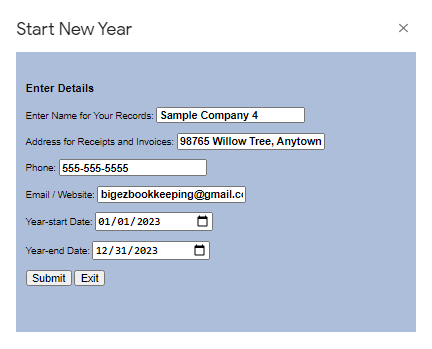
This will allow you to make a copy for another year of accounting based on your current accounting sheet. It will have all the same Categories and Subcategories, as well as your starting balances in column E on the Settings page will already have been set up to save you time. Now you are ready to start entering transactions for the new year.